Earlier work · Automation
SFTP Transfer Automation
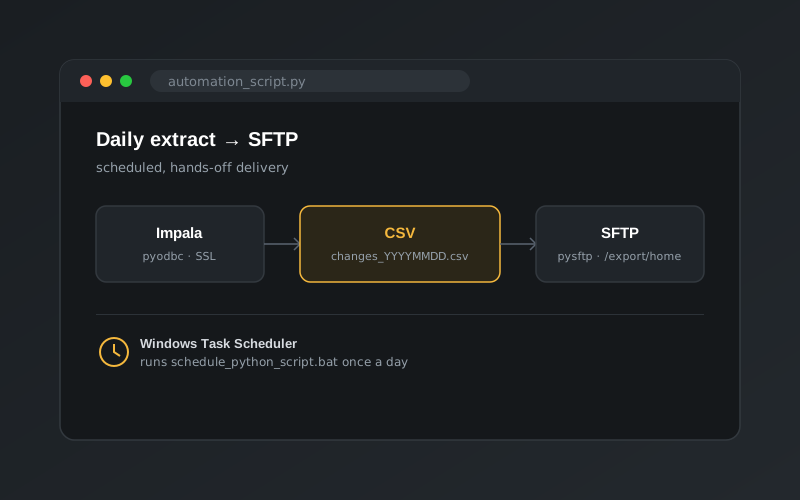
A scheduled Python job that pulls data from Impala, writes a dated CSV and delivers it to the right folder on an SFTP server, with no manual steps.
The problem
A downstream team needed a fresh extract of data every day, delivered as a CSV file to a folder on their SFTP server. Doing this by hand meant running a query, exporting the results, logging in to the server and uploading the file, every single day. It was slow and easy to forget.
The solution
A Python script that does the whole job end to end, scheduled to run automatically at a set time each day.
1. Query the data warehouse
- Connects to Cloudera Impala over ODBC (
pyodbc) using SSL and a trusted certificate. The password is read from an environment variable rather than hard-coded. - Runs the extract query and loads the rows into a pandas DataFrame, keeping the column names from the cursor.
2. Write a dated file
The DataFrame is saved as a CSV named with the run date, for example changes_20210627-1100.csv. Every delivery has a unique, sortable name, and nothing is overwritten.
3. Deliver over SFTP
- Connects to the SFTP server with
pysftp. - Moves into the target directory and lists its contents to confirm the expected structure is there.
- Uploads the CSV and logs a confirmation line for each step, so any failure is easy to spot in the output.
4. Schedule it
- A two-line
.batfile runs the script with the right Python interpreter. - Windows Task Scheduler triggers the batch file daily at the chosen time.
Outcome
The daily hand-off went from a manual, error-prone routine to a hands-off job, and the same pattern of query, export, deliver and schedule can be reused for other recurring extracts.