Earlier work · Developer Tooling
Client-Side Git Hooks
Client-side hooks that auto-format Python with Black, enforce commit-message rules and block unwanted rebases, installed with one script.
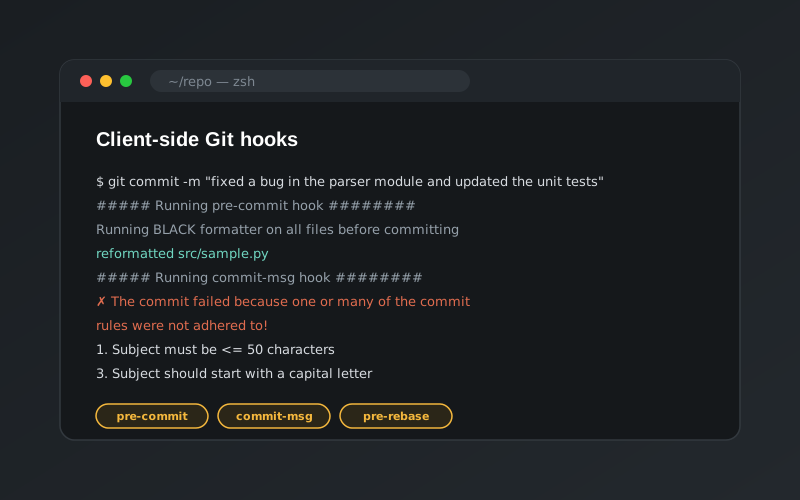
What are Git hooks?
Git hooks are scripts that Git runs automatically at key points in its workflow, such as before a commit is created or before a rebase starts. They live in each repository’s .git/hooks folder, can be written in any language with a shebang line, and only run if they are executable. If a hook exits with a non-zero status, Git stops the action.
Client-side hooks run on a developer’s machine (commit, rebase, push and so on). Server-side hooks run on the Git server when pushes arrive. This project focuses on client-side hooks for enforcing team conventions before code ever leaves a laptop.
Hooks in this project
All three hooks are written in Python.
pre-commit: consistent formatting
Runs the Black formatter over the src/ folder before every commit, so code style is never a review comment.
commit-msg: commit message rules
Reads the commit message and rejects the commit, with a list of the rules, if any of them are broken:
- The subject line must start with a capital letter and be 50 characters or fewer.
- Every body line must be 72 characters or fewer.
- No profanity.
Comment lines starting with # are ignored, as Git ignores them too.
pre-rebase: protect history
Exits with an error to abort the rebase, showing how a team can stop people rewriting commits that have already been shared.
Installation
Hooks inside .git/hooks aren’t version-controlled, so they can’t be shared by simply committing them. The project solves this by keeping the hooks in a tracked hooks/ folder and providing one-step installers, install_hooks.sh for Linux and macOS and install_hooks.bat for Windows. The installers:
- remove any existing hooks of the same name,
- symlink
.git/hooks/<hook>to the tracked script, and - make the hooks executable.
Because they are symlinks, any update to a hook in the repository takes effect for everyone after their next pull.
To skip a hook in an emergency, use --no-verify, for example git commit -m "Hotfix" --no-verify.
Documentation
The repository also includes a slide deck explaining every hook type: the commit workflow hooks, other client-side hooks such as pre-push and post-checkout, email-workflow hooks, and server-side hooks such as pre-receive and post-receive.